
Automation vs augmentation: how to decide what to automate and where human skill still reigns
As artificial intelligence moves from hype to reality, every entrepreneur and UX/UI designer faces a key question: which tasks should be handed over to machines, and which must remain human? The path you choose determines not just productivity — it determines relevance, quality, and competitive advantage.
Based on NN/g’s “Redefine Your Design Skills to Prepare for AI” (Vallejo, January 2025) and supporting research, here are the distinctions, why they matter, and how to act.
Based on NN/g’s “Redefine Your Design Skills to Prepare for AI” (Vallejo, January 2025) and supporting research, here are the distinctions, why they matter, and how to act.
1. What do “automation” and “augmentation” mean
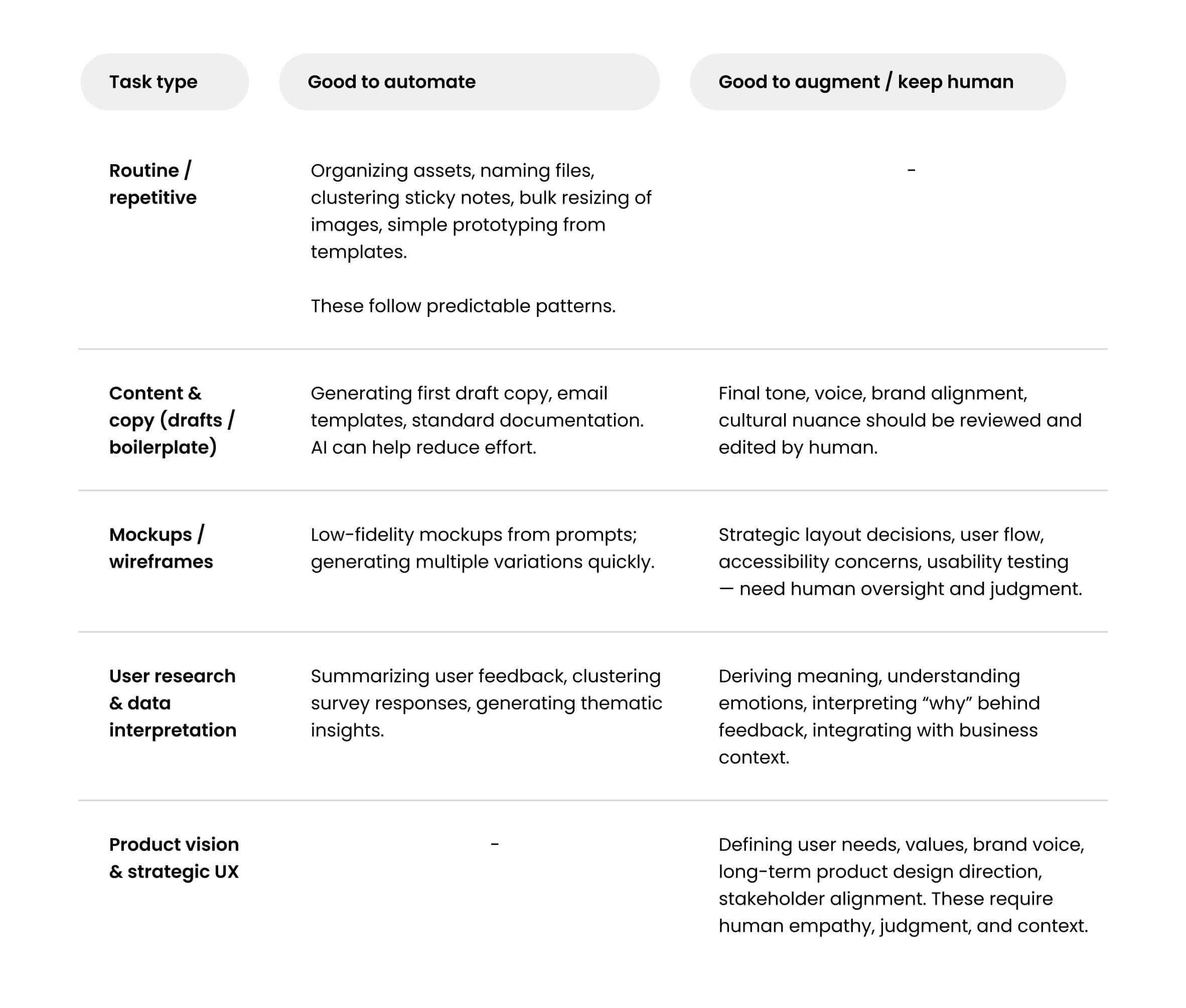
- Automation refers to using AI or tools to handle predictable, repetitive, rule-based tasks — think clustering sticky notes, generating mockups, organizing design assets, drafting content from templates. NN/g cites examples like Miro or Mural clustering sticky notes, or using ChatGPT to draft emails.
- Augmentation means the AI supports, enhances, or expands what a human can do: interpreting complex data without a data analyst, defining the rules that generate screens, exploring design directions, or developing strategic vision. AI doesn’t replace judgment; it amplifies it.
2. Why it’s critical for entrepreneurs and designers
- NN/g points out that jobs involving predictable, automation-friendly tasks are under pressure: demand has dropped for roles that are automation-prone.
- At the same time, augmentation opens up new possibilities — designers expanding into data interpretation, strategy, definition of systems. Those who stick to only executing tactical design are likely to be outrun by those who embrace higher-level skills.
- Competition intensifies: if one person can now handle more via AI, then others must raise the bar. This puts a premium on strategic, user-centric thinking, on vision, empathy, and synthesis.
3. Which tasks should be automated vs kept human / augmented
Here’s a chart of task types and guidance — what is safe to automate, what to augment, and what to keep human:
4. Principles to guide automation vs augmentation
NN/g offers several principles that are especially useful for making decisions in a business/design context:
- Principle 1: own strategic thinking while outsourcing tactical tasks — Delegating routine tasks to AI frees time and energy to think bigger: vision, product strategy, user empathy. But strategic tasks shouldn’t be automated, because they require nuance.
- Principle 2: balance trust in AI with scrutiny — AI makes mistakes, biased suggestions, or generic outputs. Always put human review and feedback loops.
- Principle 4: embrace team augmentation — Make tools, workflows, and roles so people can collaborate with AI. That means investing in skills, redefining team roles, not just tools.
5. Real market data & trends
- According to NN/g, research from Harvard Business School, German Institute for Economic Research, and UK’s Imperial College London Business School shows that demand for automation-prone jobs fell by about 21% in the months after ChatGPT’s release (late 2022).
- Designers who expand into augmentation tasks — data work, strategic UX, working with AI agents — are better positioned to grow, no matter where the market is weak for entry-level or purely execution roles.
6. Recommendations: what to do as a designer / entrepreneur
Here are practical steps for you — whether running a startup, hiring design team, or working as a designer — to make the right automation vs augmentation choices.
1 - Audit your tasks
2 - Invest in skill development
3 - Set up hybrid workflows
4 - Define team roles for the AI era
5 - Value empathy, ethics, context
6 - Measure impact, continuously adapt
- List your daily design workflows. Mark which ones are repetitive / low-judgment (good candidates for automation) vs those needing human insight.
- For entrepreneurs: ask your team or evaluate processes in your product cycle where design bottlenecks exist.
2 - Invest in skill development
- Build strategic skills: user research interpretation, product vision, stakeholder communication, design ethics.
- Learn to work with AI tools: formulating prompts, evaluating AI output, integrating AI into workflows without losing quality.
3 - Set up hybrid workflows
- Use AI for drafts, prototypes, variant generation. But always have human review, usability testing, continuous feedback with real users.
- Embed checks for bias, inclusive design, accessibility.
4 - Define team roles for the AI era
- Role of “AI-augmented designer” who is both creator and curator.
- Possibly hire or train AI-prompting specialists, data interpreters, design strategists to layer on human judgment.
5 - Value empathy, ethics, context
- The human strengths that AI cannot replicate: understanding emotions, context, user stories, culture, brand voice.
- These are differentiators in UX/UI; don’t let automation erode them.
6 - Measure impact, continuously adapt
- Track the effect of automation on time saved, quality, user satisfaction.
- If automation is cutting corners or reducing user experience, re-evaluate.
Conclusion
Automation vs augmentation isn’t a binary choice — it’s a spectrum where smart entrepreneurs & designers use AI to handle routine work and free humans for what machines cannot do well.
By making intentional decisions: what to automate, what to augment, and what to keep human, you protect quality, enhance value, and maintain your leadership in design.
As a UX/UI designer, I believe our future lies in hybrid intelligence — where AI tools + human judgment + strategic vision converge. Entrepreneurs who understand this will build more resilient, creative, and humane businesses.
By making intentional decisions: what to automate, what to augment, and what to keep human, you protect quality, enhance value, and maintain your leadership in design.
As a UX/UI designer, I believe our future lies in hybrid intelligence — where AI tools + human judgment + strategic vision converge. Entrepreneurs who understand this will build more resilient, creative, and humane businesses.